
What are SKU/location groups?
What a SKU/location group is
A SKU/location group is a set of variants that share the exact same SKU at the same Shopify location.
SKU Stock Sync uses these groups to decide which variants should share inventory and sync together.
Think of a SKU/location group as: same SKU + same location = can sync together.
If variants are not in the same SKU/location group, they are treated as separate for syncing.
How a group is formed
For variants to be grouped together, both of these must be true:
They use the exact same SKU
They are stocked at the same Shopify location
Both conditions matter:
Same SKU alone is not enough. If the location is different, the variants stay separate.
Same location alone is not enough. If the SKU is different, the variants stay separate.
If 2 or more variants share the same SKU at the same location, they can be grouped.
Why groups exist
SKU/location groups are useful when multiple Shopify variants represent the same physical stock.
For example, you may have multiple variants or listings that should stay aligned because they all point to the same real-world item. SKU Stock Sync uses the group to identify those related variants and keep them in sync.
The product itself does not matter for grouping. Variants can be:
in the same product, or
in different products
If the SKU and location both match, they can still belong to the same group.
Why location matters
Shopify tracks inventory separately by location. A variant can have one stock level at one location and a different stock level at another.
SKU Stock Sync respects those separate location stock levels. That means the app syncs inventory per location, not across every location in your store.
The app should not take stock from one location and apply it to another. Matching happens within each location separately.
If the same SKU exists at more than one location, SKU Stock Sync treats each location as its own separate grouping context.
Example
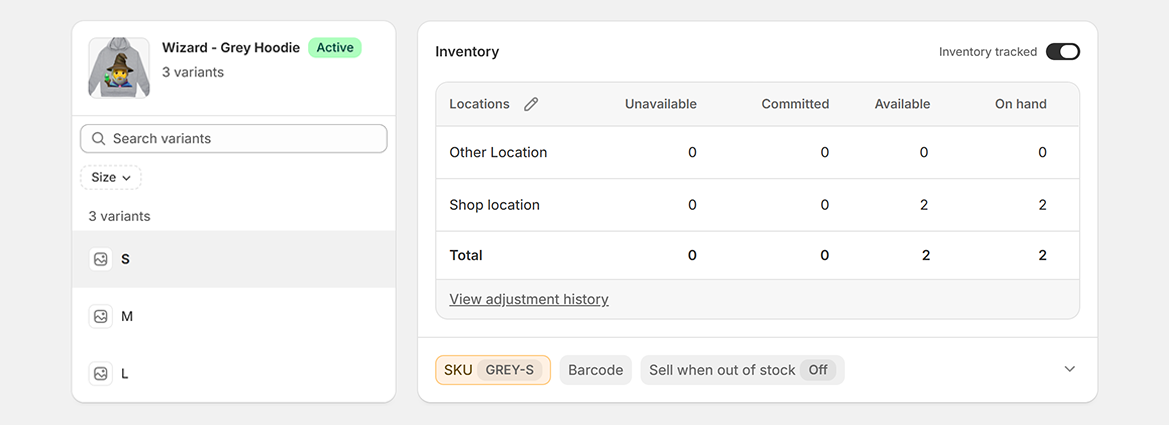
In this example, the variant uses the SKU GREY-S. You can see inventory is tracked separately at Other Location and Shop location.
That means the app does not treat all GREY-S inventory in the store as one combined stock pool. Instead, each location is handled separately.
What counts as the same SKU
SKUs must match exactly.
Small differences can stop variants from being grouped, including:
different spelling
extra spaces
different punctuation or characters
inconsistent formatting
For example, these may be treated as different SKUs:
GREY-SGREY S"GREY-S"grey-s
Blank or missing SKUs cannot be reliably grouped.
If variants should sync together, make sure the SKU is entered consistently everywhere. If variants should not sync together, they should not share the same SKU.
Quick checklist
If you are trying to decide whether variants can be grouped, check these first:
Do they have the exact same SKU?
Are they stocked at the same Shopify location?
Do they represent the same physical stock?
Are the SKUs filled in consistently, with no blank values or accidental differences?
If the answer to all of those is yes, they can usually be grouped.